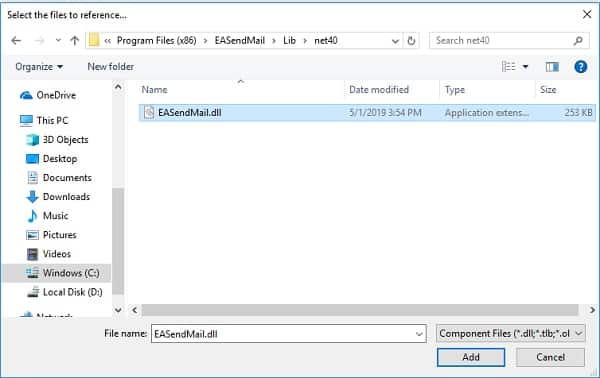
Add Reference of EASendMail SMTP Component to Visual Stuido.NET Project
To use EASendMail SMTP Component in your project, the first step is "Add reference of EASendMail to your project". Please create/open your project with Visual Studio.NET, then choose menu->"Project"->"Add Reference"->".NET"->"Browse...", and choose the "Installation Path\Lib\[netversion]\EASendMail.dll" from your disk, click "Open"->"OK", the reference of EASendMail will be added to your project, and you can start to use EASendMail SMTP Component in your project.
Install from NuGet
You can also install the run-time assembly by NuGet. Run the following command in the NuGet Package Manager Console:
Install-Package EASendMail
Deploying EASendMail SMTP Component with Application
After compiling your project, a copy of EASendMail.dll will be generated by compiler in same folder of your application executable file. Packing all the *.dll and *.exe in the folder to installer is ok. As EASendMail is a pure .NET Component, it doesn't require "Regsvr32" (self-register) to register the dll.
Deploying EASendMail SMTP Component with ASP.NET/Web Application
The EASendMail.dll should be copied to [website root folder]\bin folder or [virtual directory root]\bin folder. If the project is created by Visual Studio.NET + FrontPage Extension directly, Visual Studio.NET will deploy EASendMail.dll automatically.
Seperate builds of run-time assembly for .NET Framework 2.0, 3.5, 4.0, 4.5, 4.61, 5.0, .NET Core 3.1, .NET Standard 2.0 and .NET Compact Framework 2.0, 3.5.
| File | .NET Framework Version |
| Lib\net20\EASendMail.dll |
Built with .NET Framework 2.0
It requires .NET Framework 2.0, 3.5 or later version. |
| Lib\net40\EASendMail.dll |
Built with .NET Framework 4.0
It requires .NET Framework 4.0 or later version. |
| Lib\net45\EASendMail.dll |
Built with .NET Framework 4.5
It requires .NET Framework 4.5 or later version. |
| Lib\net461\EASendMail.dll |
Built with .NET Framework 4.6.1
It requires .NET Framework 4.6.1 or later version. |
| Lib\netcoreapp3.1\EASendMail.dll |
Built with .NET Core 3.1
It requires .NET Core 3.1 or later version. |
| Lib\net5.0\EASendMail.dll |
Built with .NET 5.0
It requires .NET 5.0 or later version. |
| Lib\netstandard2.0\EASendMail.dll |
Built with .NET Standard 2.0
It requires .NET Standard 2.0 or later version. |
| Lib\net20-cf\EASendMail.dll |
Built with .NET Compact Framework 2.0
It requires .NET Compact Framework 2.0, 3.5 or later version. |
| Lib\net35-cf\EASendMail.dll |
Built with .NET Compact Framework 3.5
It requires .NET Compact Framework 3.5 or later version. |
Run-time library for .NET Compact Framework 2.0, 3.5
To use EASendMail in .NET Compact Framework 2.0 or 3.5, you should use Lib\net20-cf\EASendMail.dll or Lib\net20-cf\EASendMail.dll in your project. And if SSL/TLS connection is used in .NET Compact Framework 2.0 or 3.5, you should also copy "SecurityInterface.dll" to the same folder of your application.
Note: CF version of EASendMail.dll does not support digital signature, message encryption, domainkeys/DKIM and direct sending email (DNS lookup).
Install EASendMail SMTP Component to Global Assembly Cache - SSIS
For SQL Server Integration Services (SSIS) or other .NET integrated script platform, it requires external DLL to be installed into .NET Global Assembly Cache. You can install EASendMail to Global Assembly Cache like this:
If you have Visual Studio installed on your computer: On the taskbar, click Start, click All Programs, click Visual Studio, click Visual Studio Tools, and then click Visual Studio Command Prompt. - For Windows Vista or later OS, Please right-click and click "Run As Administrator".
-or-
If you have the Windows SDK installed on your computer: On the taskbar, click Start, click All Programs, click the folder for the Windows SDK, and then click Command Prompt (or CMD Shell). - For Windows Vista or later OS, Please right-click and click "Run As Administrator".
At the command prompt, type the following: (Please change C:\Program Files (x86)\EASendMail to EASendMail installation path, and change Lib\net35\EASendMail.dll to the DLL that you refered in your project.)
gacutil /i "C:\Program Files (x86)\EASendMail\Lib\net35\EASendMail.dll"
Press enter, EASendMail will be installed to .NET framework 3.5 Global Assembly Cache.
To uninstall it from Global Assembly Cache, type the following:
gacutil /u "EASendMail"
Mail Address Syntax
For single email address (From), the syntax can be ["][display name]["]<email
address>.
For example, "Tester, T" <test@adminsystem.com>, Tester <test@adminsystem.com>,
<test@adminsystem.com> or test@adminsystem.com.
For mulitple email address (To, CC, Bcc), the syntax can be [single email],[single
email]... (,;\r\n) can be used to separate multiple email addresses.
For example: "Tester, T" <test1@adminsystem.com>, Tester2 <test2@adminsystem.com>,
<test3@adminsystem.com>, test4@adminsystem.com
Server Address Syntax
The server syntax is [server ip or domain] [port]. SPACE is used to separate server
address and port. If port is not specified, default port 25 will be used.
For example: localhost 25 or localhost.
Example
[Visual Basic, C#, C++, JScript.NET] The following example demonstrates how to send email with EASendMail SMTP Component, but it doesn't demonstrates the events usage. To get the full samples of EASendMail, please refer to Samples section.
[VB - Send Email Example]

Imports EASendMail

Public Sub SendMail(sender As String,
    toRecipients As String,
    ccRecipients As String,
    subject As String,
    bodyText As String,
    server As String,
    user As String,
    password As String,
    useSsl As Boolean)

    Try
        ' From is a MailAddress object, it also supports implicit converting from string directly.
        ' The syntax is like this: "test@adminsystem.com" or "Tester <test@adminsystem.com>"

        ' oMail.From = New MailAddress("Tester", "test@adminsystem.com")
        ' oMail.From = New MailAddress("Tester <test@adminsystem.com>")
        ' oMail.From = New MailAddress("test@adminsystem.com")

        ' To, Cc and Bcc is a AddressCollection object, it also supports implicit converting from string directly.
        ' multiple addresses should be separated with (,;)
        ' The syntax is like this: "test@adminsystem.com, test1@adminsystem.com"

        ' oMail.To = New AddressCollection("test1@adminsystem.com, test2@adminsystem.com")
        ' oMail.To = New AddressCollection("Tester1 <test@adminsystem.com>, Tester2 <test2@adminsystem.com>")

        ' You can add more recipient by Add method
        ' oMail.To.Add(New MailAddress("tester", "test@adminsystem.com"))

        Dim oMail As SmtpMail = New SmtpMail("TryIt")

        oMail.From = New MailAddress(sender)
        oMail.To = New AddressCollection(toRecipients)
        oMail.Cc = New AddressCollection(ccRecipients)

        oMail.Subject = subject
        ' If bodyText contains html tags, please use
        ' oMail.HtmlBody = bodyText
        oMail.TextBody = bodyText

        ' Add attachment
        ' oMail.AddAttachment("c:\test.gif")

        ' Set server address
        Dim oServer As SmtpServer = New SmtpServer(server)
        If user.Length > 0 And password.Length > 0 Then
            ' Set user/password for ESMTP authentication
            oServer.User = user
            oServer.Password = password
        End If

        ' Most mordern SMTP servers require SSL/TLS connection now.
        ' ConnectTryTLS means if server supports SSL/TLS, SSL/TLS will be used automatically.
        oServer.ConnectType = If(useSsl, SmtpConnectType.ConnectSSLAuto, SmtpConnectType.ConnectTryTLS)

        Dim oSmtp As SmtpClient = New SmtpClient()

        ' To generate a log file for SMTP transaction, please use
        ' oSmtp.LogFileName = "c:\smtp.txt"

        oSmtp.SendMail(oServer, oMail)

        Console.WriteLine("The message has been submitted to server successfully!")
    Catch ex As Exception
        Console.WriteLine("Exception: {0}", ex.Message)
    End Try

End Sub


[C# - Send Email Example]

using System;
using System.Collections;
using EASendMail;

public static void SendMail(string sender,
        string toRecipients,
        string ccRecipients,
        string subject,
        string bodyText,
        string server,
        string user,
        string password,
        bool useSsl)
{
    try
    {
        // From is a MailAddress object, it also supports implicit converting from string.
        // The syntax is like this: "test@adminsystem.com" or "Tester <test@adminsystem.com>"

        // oMail.From = new MailAddress("Tester", "test@adminsystem.com");
        // oMail.From = new MailAddress("Tester <test@adminsystem.com>");
        // oMail.From = new MailAddress("test@adminsystem.com");

        // To, Cc and Bcc is a AddressCollection object, it also supports implicit converting from string.
        // multiple addresses should be separated with (,;)
        // The syntax is like this: "test@adminsystem.com, test1@adminsystem.com"

        // oMail.To = new AddressCollection("test1@adminsystem.com, test2@adminsystem.com");
        // oMail.To = new AddressCollection("Tester1<test@adminsystem.com>, Tester2<test2@adminsystem.com>");

        // You can add more recipient by Add method
        // oMail.To.Add( new MailAddress( "tester", "test@adminsystem.com"));

        SmtpMail oMail = new SmtpMail("TryIt");
        oMail.From = sender;

        oMail.To = toRecipients;
        oMail.Cc = ccRecipients;

        oMail.Subject = subject;
        // If bodyText contains the html tags, please use
        // oMail.HtmlBody = bodyText;
        oMail.TextBody = bodyText;

        // Add attachment
        // oMail.AddAttachment("c:\\test.gif");

        // Set server address
        SmtpServer oServer = new SmtpServer(server);
        if (user.Length != 0 && password.Length != 0)
        {
            // Set user/password for ESMTP authentication
            oServer.User = user;
            oServer.Password = password;
        }

        // Most mordern SMTP servers require SSL/TLS connection now.
        // ConnectTryTLS means if server supports SSL/TLS, SSL/TLS will be used automatically.
        oServer.ConnectType = (useSsl) ? SmtpConnectType.ConnectSSLAuto : SmtpConnectType.ConnectTryTLS;

        SmtpClient oSmtp = new SmtpClient();

        // To generate a log file for SMTP transaction, please use
        // oSmtp.LogFileName = "c:\\smtp.txt";

        oSmtp.SendMail(oServer, oMail);

        Console.WriteLine("The message has been submitted to server successfully!");
    }
    catch (Exception exp)
    {
        Console.WriteLine("Exception: {0}", exp.Message);
    }
}


[C++/CLI - Send Email Example]

using namespace System;
using namespace System::Collections;
using namespace EASendMail;

static void SendMail(String ^sender,
	String ^toRecipients,
	String ^ccRecipients,
	String ^subject,
	String ^bodyText,
	String ^server,
	String ^user,
	String ^password,
	bool useSsl)
{
    try
    {
        // From is a MailAddress object, it also supports implicit converting from string.
        // The syntax is like this: "test@adminsystem.com" or "Tester <test@adminsystem.com>"

        // oMail->From = gcnew MailAddress("Tester", "test@adminsystem.com");
        // oMail->From = gcnew MailAddress("Tester <test@adminsystem.com>");
        // oMail->From = gcnew MailAddress("test@adminsystem.com");

        //To, Cc and Bcc is a AddressCollection object, it also supports implicit converting from string.
        // multiple address should be separated with (,;)
        //The syntax is like this: "test@adminsystem.com, test1@adminsystem.com"

        // oMail->To  = gcnew AddressCollection("test1@adminsystem.com, test2@adminsystem.com");
        // oMail->To = gcnew AddressCollection("Tester1 <test@adminsystem.com>, Tester2 <test2@adminsystem.com>");

        // You can add more recipient by Add method
        // oMail->To->Add(gcnew MailAddress("tester", "test@adminsystem.com"));

        SmtpMail ^oMail = gcnew SmtpMail("TryIt");

        oMail->From = gcnew EASendMail::MailAddress(sender);
        oMail->To = gcnew EASendMail::AddressCollection(toRecipients);
        oMail->Cc = gcnew EASendMail::AddressCollection(ccRecipients);

        oMail->Subject = subject;

        // If bodyText contains html tags, please use
        // oMail->HtmlBody = bodyText;
        oMail->TextBody = bodyText;

        // Add attachment
        // oMail->AddAttachment("c:\\test.gif");

        // Set server address
        SmtpServer ^oServer = gcnew SmtpServer(server);
        if (user->Length != 0 && password->Length != 0)
        {
            // Set user/password for ESMTP authentication
            oServer->User = user;
            oServer->Password = password;
        }

        // Most mordern SMTP servers require SSL/TLS connection now.
        // ConnectTryTLS means if server supports SSL/TLS, SSL/TLS will be used automatically.
        oServer->ConnectType = (useSsl) ? SmtpConnectType::ConnectSSLAuto : SmtpConnectType::ConnectTryTLS;

        SmtpClient ^oSmtp = gcnew SmtpClient();

        // To generate a log file for SMTP transaction, please use
        // oSmtp->LogFileName = "c:\\smtp.txt";

        oSmtp->SendMail(oServer, oMail);

        Console::WriteLine("The message has been submitted to server successfully!");
    }
    catch (Exception ^exp)
    {
        Console::WriteLine("Exception: {0}", exp->Message);
    }
}


[JScript.NET - Send Email Example]

public function SendMail(sender:String,
    toRecipients:String,
    ccRecipients:String,
    subject:String,
    bodyText:String,
    server:String,
    user:String,
    password:String,
    useSsl:Boolean)
{
    try
    {
        // From is a MailAddress object, it also supports implicit converting from string.
        // The syntax is like this: "test@adminsystem.com" or "Tester <test@adminsystem.com>"

        // oMail.From = new MailAddress("Tester", "test@adminsystem.com");
        // oMail.From = new MailAddress("Tester<test@adminsystem.com>");
        // oMail.From = new MailAddress("test@adminsystem.com");

        // To, Cc and Bcc is a AddressCollection object, it also supports implicit converting from string.
        // multiple addresses should be separated with (,;)
        // The syntax is like this: "test@adminsystem.com, test1@adminsystem.com"

        // oMail.To = new AddressCollection("test1@adminsystem.com, test2@adminsystem.com");
        // oMail.To = new AddressCollection("Tester1 <test@adminsystem.com>, Tester2 <test2@adminsystem.com>");

        // You can add more recipient by Add method
        // oMail.To.Add(new MailAddress("tester","test@adminsystem.com"));

        var oMail:SmtpMail =  new SmtpMail("TryIt");

        oMail.From  = new MailAddress(sender);
        oMail.To = new AddressCollection(toRecipients);
        oMail.Cc = new AddressCollection(ccRecipients);

        oMail.Subject = subject;

        // If bodyText contains html tags, please use
        // oMail.HtmlBody = bodyText;
        oMail.TextBody = bodyText;

        // Add attachment
        // oMail.AddAttachment("c:\\test.gif");

        // Set server address
        var oServer:SmtpServer = new SmtpServer(server);
        if(user.Length != 0 && password.Length != 0)
        {
            // Set user/password for ESMTP authentication
            oServer.User = user;
            oServer.Password = password;
        }

        // Most mordern SMTP servers require SSL/TLS connection now.
        // ConnectTryTLS means if server supports SSL/TLS, SSL/TLS will be used automatically.
        oServer.ConnectType = (useSsl)? SmtpConnectType.ConnectSSLAuto : SmtpConnectType.ConnectTryTLS;

        var oSmtp:SmtpClient = new SmtpClient();

        // To generate a log file for SMTP transaction, please use
        // oSmtp.LogFileName = "c:\\smtp.txt";

        oSmtp.SendMail(oServer, oMail);

        Console.WriteLine("The message has been submitted to server successfully!");
    }
    catch(exp:System.Exception)
    {
        Console.WriteLine("Exception: {0}", exp.Message);
    }
}
See Also
User Authentication and SSL Connection
Enable TLS 1.2 on Windows XP/2003/2008/7/2008 R2
Using Gmail SMTP OAUTH
Using Gmail/GSuite Service Account + SMTP OAUTH Authentication
Using Office365 EWS OAUTH
Using Office365 EWS OAUTH in Background Service
Using Hotmail SMTP OAUTH
From, ReplyTo, Sender and Return-Path
Digital Signature and E-mail Encryption
DomainKeys and DKIM Signature
Send E-mail Directly (Simulating SMTP server)
Work with EASendMail Service (Email Queuing)
Bulk Email Sender Guidelines
Process Bounced Email (Non-Delivery Report) and Email Tracking
EASendMail .NET Namespace References
EASendMail SMTP Component Samples
Online Tutorials
Send Email
in VB 6.0 - Tutorial
Send
Email in C# - Tutorial
Send
Email in VB.NET - Tutorial
Send Email
in Visual C++ - Tutorial
Send Email in Managed C++/CLI - Tutorial
Send
Email in Delphi - Tutorial
Send
Email in MS SQL stored procedure - Tutorial