

EA SMTP Server for Windows
Platform:
Windows 2012 - 2025 or later (32bit/x64)
.NET framework 4.5 installed
A Windows SMTP Server as IIS SMTP alternative which supports DKIM, opportunistic TLS, message throttling, accepted domains, multiple receive connectors and send connectors. It is designed as a replacement for IIS SMTP Server to relay email message from Windows Server. Full journal for each email message and customized sender based routing are supported as well.
Download free trial of EA SMTP Server for Windows
Don't hesitate. Try it out now!
EA SMTP Server Architecture
The following diagram shows the relationships among the components in the EA SMTP Server.
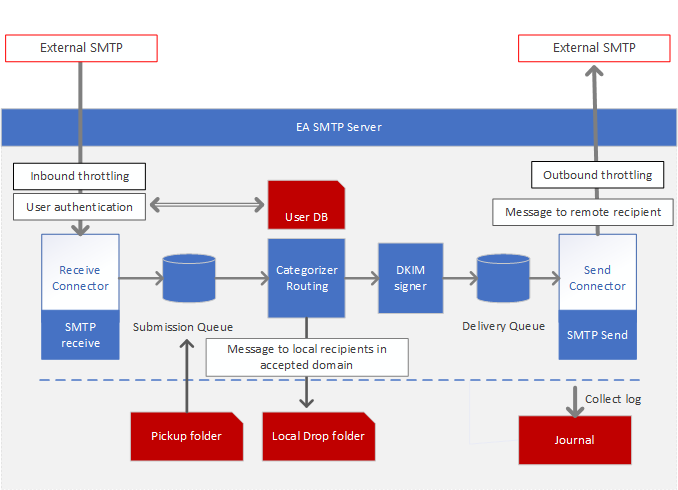
- Receive Connector: Accepts inbound SMTP connections and email messages destined for the local EA SMTP Server.
- Send Connector: Establishes outbound SMTP connections and relays email messages to remote SMTP servers.
- Submission Queue: Temporarily stores inbound email messages before they are processed.
- Categorizer: Categorizes email messages and routes them to either the delivery queue or a local drop folder..
- Delivery Queue: Temporarily stores outbound email messages before they are sent to remote servers.
- DKIM Signer: Adds a DKIM signature to outgoing email messages for authentication.
- Pickup Folder: Picks up RFC 822-compliant email files and sends them to the submission queue..
- Accepted Domains: Controls which domains and recipients the server will accept emails for.
- User DB: Stores user information; only authenticated users can relay messages through the local EA SMTP Server.
- Throttling Control: Control connection rates and message throughput to prevent server overload.
- Journal: Collects and stores email logs in a local database for auditing and troubleshooting.
IIS SMTP and EA SMTP Server: Key Differences and Comparison
| IIS SMTP Server | EA SMTP Server | |
| Virtual Server | YES | EA SMTP Server does not use the concept of “Virtual Servers”. Instead, it adopts Receive Connectors and Send Connectors, consistent with the design used in Exchange Server. |
| Local Domain and Remote Domain | YES | YES |
| Ssl Certificate | Automatic selection | Automatic and manual selection of SSL certificates |
| Windows User Integration | YES | YES |
| External User | - | YES |
| Pickup and Drop | YES | YES |
| Address Space | - | YES |
| Sender Based Routing | - | YES |
| Inbound and Outboud Throttling | - | YES |
| Outbound IP Binding | Always use primary IP address | Supports manual selection of outbound IP address |
| Opportunisic TLS | - | YES |
| Mutual TLS | - | YES |
| DKIM | - | YES |