Digital signature prevents email content is faked or changed in transport level. Encrypting email protects email content from exposure to inappropriate recipients. Both digital signature and email encrypting depend on digital certificate.
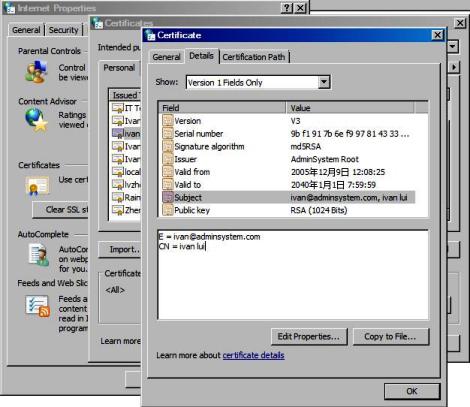
Digital signature is always signed by sender certificate. The certificate used to sign email content MUST have the public/private key pair. First of all, the user MUST get a digital certificate for personal email protection from third-party certificate authorities such as www.verisign.com. After the certificate is installed on the machine, it can be viewed by "Control Pannel" -> "Internet Options" -> "Content" -> "Certificates" -> "Personal". When you view the certificate, please note there is a line "You have a private key that corresponds to this certificate" in the certificate view, that means you are able to use this certificate to sign email content. If this line doesn't appear, that means you are unable to sign the email content by this certificate. To sign email content with EASendMail, the certificate with private key is required to be imported to Mail.SignerCert properly.
[Visual Basic, Visual C++, Delphi] The following example demonstrates how to load certificate to sign email content with EASendMail SMTP Component. To get the full samples of EASendMail, please refer to Samples section.
[VB6, VBA - Sign Email with Certificate]
Const ConnectNormal = 0
Const ConnectSSLAuto = 1
Const ConnectSTARTTLS = 2
Const ConnectDirectSSL = 3
Const ConnectTryTLS = 4

Const CRYPT_MACHINE_KEYSET = 32
Const CRYPT_USER_KEYSET = 4096
Const CERT_SYSTEM_STORE_CURRENT_USER = 65536
Const CERT_SYSTEM_STORE_LOCAL_MACHINE = 131072
Const CERT_STORE_PROV_LDAP_STORE = 16

Private Sub btnSendMail_Click()

    Dim oSmtp As New EASendMailObjLib.Mail
    oSmtp.LicenseCode = "TryIt"

    ' Your SMTP server address
    oSmtp.ServerAddr = "smtp.emailarchitect.net"

    ' User and password for ESMTP authentication
    oSmtp.UserName = "test@emailarchitect.net"
    oSmtp.Password = "testpassword"

    ' If server supports SSL/TLS connection, SSL/TLS is used automatically.
    oSmtp.ConnectType = ConnectTryTLS

    ' Set your sender email address
    oSmtp.FromAddr = "test@emailarchitect.net"

    ' Add recipient email address
    oSmtp.AddRecipientEx "support@emailarchitect.net", 0

    ' Set email subject
    oSmtp.Subject = "test email from VB 6.0 with digital signature"

    ' Set email body
    oSmtp.BodyText = "this is a test email sent from VB 6.0 with digital signature"

    ' Add digital signature
    If Not oSmtp.SignerCert.FindSubject("test@emailarchitect.net", _
        CERT_SYSTEM_STORE_CURRENT_USER, "my") Then
        MsgBox oSmtp.SignerCert.GetLastError()
        Exit Sub
    End If

    If Not oSmtp.SignerCert.HasPrivateKey Then
        MsgBox "Signer certificate has not private key, " & _
             " this certificate can not be used to sign email!"
        Exit Sub
    End If

    MsgBox "start to send email ..."

    If oSmtp.SendMail() = 0 Then
        MsgBox "email was sent successfully!"
    Else
        MsgBox "failed to send email with the following error:" & oSmtp.GetLastErrDescription()
    End If

End Sub


[VC++ - Sign Email with Certificate]
#include "stdafx.h"
#include <tchar.h>
#include <Windows.h>

#include "EASendMailObj.tlh"
using namespace EASendMailObjLib;

const int ConnectNormal = 0;
const int ConnectSSLAuto = 1;
const int ConnectSTARTTLS = 2;
const int ConnectDirectSSL = 3;
const int ConnectTryTLS = 4;

int _tmain(int argc, _TCHAR* argv[])
{
    ::CoInitialize(NULL);

    IMailPtr oSmtp = NULL;
    oSmtp.CreateInstance(__uuidof(EASendMailObjLib::Mail));
    oSmtp->LicenseCode = _T("TryIt");

    // Your SMTP server address
    oSmtp->ServerAddr = _T("smtp.emailarchitect.net");

    // User and password for ESMTP authentication
    oSmtp->UserName = _T("test@emailarchitect.net");
    oSmtp->Password = _T("testpassword");

    // If server supports SSL/TLS connection, SSL/TLS is used automatically.
    oSmtp->ConnectType = ConnectTryTLS;

    // Set your sender email address
    oSmtp->FromAddr = _T("test@emailarchitect.net");

    // Add recipient email address
    oSmtp->AddRecipientEx(_T("support@emailarchitect.net"), 0);

    // Set email subject
    oSmtp->Subject = _T("email from Visual C++ with digital signature(S/MIME)");

    // Set email body
    oSmtp->BodyText = _T("this is a test email sent from Visual C++ with digital signature");

    // Add signer digital signature
    if(oSmtp->SignerCert->FindSubject(_T("test@emailarchitect.net"),
        CERT_SYSTEM_STORE_CURRENT_USER , _T("my")) == VARIANT_FALSE)
    {
        _tprintf(_T("Error with signer certificate; %s\r\n"),
            (const TCHAR*)oSmtp->SignerCert->GetLastError());
        return 0;
    }

    if(oSmtp->SignerCert->HasPrivateKey == VARIANT_FALSE)
    {
        _tprintf(_T("certificate does not have a private key, it can not sign email.\r\n"));
        return 0;
    }

    _tprintf(_T("Start to send email ...\r\n"));

    if(oSmtp->SendMail() == 0)
    {
        _tprintf(_T("email was sent successfully!\r\n"));
    }
    else
    {
        _tprintf(_T("failed to send email with the following error: %s\r\n"),
            (const TCHAR*)oSmtp->GetLastErrDescription());
    }

    if(oSmtp != NULL)
        oSmtp.Release();

    return 0;
}


[Delphi - Sign Email with Certificate]
Unit Unit1;

Interface

Uses
  Windows, Messages, SysUtils, Variants, Classes, Graphics, Controls, Forms,
  Dialogs, StdCtrls, EASendMailObjLib_TLB; // add EASendMail Unit

Type
  TForm1 = Class(TForm)
    Button1: TButton;
    Procedure Button1Click(Sender: TObject);
  private
    { Private declarations }
  public
    { Public declarations }
  End;

Const
  ConnectNormal = 0;
  ConnectSSLAuto = 1;
  ConnectSTARTTLS = 2;
  ConnectDirectSSL = 3;
  ConnectTryTLS = 4;

  CRYPT_MACHINE_KEYSET = 32;
  CRYPT_USER_KEYSET = 4096;
  CERT_SYSTEM_STORE_CURRENT_USER = 65536;
  CERT_SYSTEM_STORE_LOCAL_MACHINE = 131072;
  CERT_STORE_PROV_LDAP_STORE = 16;

Var
  Form1: TForm1;

Implementation

{$R *.dfm}

Procedure TForm1.Button1Click(Sender: TObject);
Var
  oSmtp : TMail;
Begin
  oSmtp := TMail.Create(Application);
  oSmtp.LicenseCode := 'TryIt';

  // Your SMTP server address
  oSmtp.ServerAddr := 'smtp.emailarchitect.net';

  // User and password for ESMTP authentication
  oSmtp.UserName := 'test@emailarchitect.net';
  oSmtp.Password := 'testpassword';

  // If server supports SSL/TLS connection, SSL/TLS is used automatically.
  oSmtp.ConnectType := ConnectTryTLS;

  // Set your sender email address
  oSmtp.FromAddr := 'test@emailarchitect.net';

  // Add recipient email address
  oSmtp.AddRecipientEx('support@emailarchitect.net', 0);

  // Set email subject
  oSmtp.Subject := 'test email from Delphi with digital signature';

  // Set body text
  oSmtp.BodyText := 'this is a test email sent from Delphi with digital signature';

  // Add digital signature
  If Not oSmtp.SignerCert.FindSubject('test@emailarchitect.net',
    CERT_SYSTEM_STORE_CURRENT_USER, 'my') Then
    Begin
      ShowMessage(oSmtp.SignerCert.GetLastError());
      exit;
    End;

  If Not oSmtp.SignerCert.HasCertificate Then
    Begin
      ShowMessage('Signer certificate has no private key, ' +
      'this certificate can not be used to sign email');
    End;

  ShowMessage('start to send email ...');

  If oSmtp.SendMail() = 0 Then
    ShowMessage('email was sent successfully!')
  Else
    ShowMessage('failed to send email with the following error: '
    + oSmtp.GetLastErrDescription());

End;

End.
You can use SignatureHashAlgorithm property to set signature algorithm to MD5, SHA1, SHA256, SHA384 or SHA512.
Encrypting email doesn't require sender certificate but the certificate with public key for every recipient. For example, from@adminsystem.com sends an email to rcpt@adminsystem.com with digital signature. The digital signature contains the public key certificate for from@adminsystem.com, then rcpt@adminsystem.com can send an encrypted email with this certificate back to from@adminsystem.com. Only from@adminsystem can read this email, because this email MUST be decrypted by private key of from@adminsystem.com. Therefore, you MUST receive an digital signed email from other people (Most email clients such as outlook, outlook express will add the certificate to the Other People Storage automatically once an digital signed email is received) before you can send encrypted email to this people. To encrypt email with EASendMail, the certificate for recipient should be loaded to RecipientsCerts property.
By default, Personal digital certificate is stored at CERT_SYSTEM_STORE_CURRENT_USER "my". Encryption digital certificates are stored at CERT_SYSTEM_STORE_CURRENT_USER "Address Book". If you want to search certificate in Windows Active Directory, please use CERT_STORE_PROV_LDAP_STORE and input LDAP query statement in storeName parameter.
[Visual Basic, Visual C++, Delphi] The following example demonstrates how to load certificate to encrypt email with EASendMail SMTP Component. To get the full samples of EASendMail, please refer to Samples section.
[VB6, VBA - Encrypt Email]
Const ConnectNormal = 0
Const ConnectSSLAuto = 1
Const ConnectSTARTTLS = 2
Const ConnectDirectSSL = 3
Const ConnectTryTLS = 4

Const CRYPT_MACHINE_KEYSET = 32
Const CRYPT_USER_KEYSET = 4096
Const CERT_SYSTEM_STORE_CURRENT_USER = 65536
Const CERT_SYSTEM_STORE_LOCAL_MACHINE = 131072
Const CERT_STORE_PROV_LDAP_STORE = 16

Private Sub btnEncryptEmail_Click()

    Dim oSmtp As New EASendMailObjLib.Mail
    oSmtp.LicenseCode = "TryIt"

    ' Your SMTP server address
    oSmtp.ServerAddr = "smtp.emailarchitect.net"

    ' User and password for ESMTP authentication
    oSmtp.UserName = "test@emailarchitect.net"
    oSmtp.Password = "testpassword"

    ' If server supports SSL/TLS connection, SSL/TLS is used automatically.
    oSmtp.ConnectType = ConnectTryTLS

    ' Set your sender email address
    oSmtp.FromAddr = "test@emailarchitect.net"

    ' Add recipient email address
    oSmtp.AddRecipientEx "support@emailarchitect.net", 0

    ' Set email subject
    oSmtp.Subject = "test encrypted email from VB 6.0 project"

    ' Set email body
    oSmtp.BodyText = "this is a test encrypted email sent from VB 6.0 project"

    ' Add digital signature
    If Not oSmtp.SignerCert.FindSubject("test@emailarchitect.net", _
        CERT_SYSTEM_STORE_CURRENT_USER, "my") Then
        MsgBox oSmtp.SignerCert.GetLastError()
        Exit Sub
    End If

    If Not oSmtp.SignerCert.HasPrivateKey Then
        MsgBox "Signer certificate has not private key, " & _
             " this certificate can not be used to sign email!"
        Exit Sub
    End If

    ' Find the encrypting certificate for every recipients
    Dim oEncryptCert As New EASendMailObjLib.Certificate
    If Not oEncryptCert.FindSubject("support@emailarchitect.net", _
                            CERT_SYSTEM_STORE_CURRENT_USER, "AddressBook") Then
        If Not oEncryptCert.FindSubject("support@emailarchitect.net", _
                                        CERT_SYSTEM_STORE_CURRENT_USER, "my") Then
            MsgBox oEncryptCert.GetLastError()
            Exit Sub
        End If
    End If

    ' Add encrypting certificate
    oSmtp.RecipientsCerts.Add oEncryptCert

    MsgBox "start to send email ..."

    If oSmtp.SendMail() = 0 Then
        MsgBox "email was sent successfully!"
    Else
        MsgBox "failed to send email with the following error:" & oSmtp.GetLastErrDescription()
    End If

End Sub


[VC++- Encrypt Email]
#include "stdafx.h"
#include <tchar.h>
#include <Windows.h>

#include "EASendMailObj.tlh"
using namespace EASendMailObjLib;

const int ConnectNormal = 0;
const int ConnectSSLAuto = 1;
const int ConnectSTARTTLS = 2;
const int ConnectDirectSSL = 3;
const int ConnectTryTLS = 4;

int _tmain(int argc, _TCHAR* argv[])
{
    ::CoInitialize(NULL);

    IMailPtr oSmtp = NULL;
    oSmtp.CreateInstance(__uuidof(EASendMailObjLib::Mail));
    oSmtp->LicenseCode = _T("TryIt");

    // Your SMTP server address
    oSmtp->ServerAddr = _T("smtp.emailarchitect.net");

    // User and password for ESMTP authentication
    oSmtp->UserName = _T("test@emailarchitect.net");
    oSmtp->Password = _T("testpassword");

    // If server supports SSL/TLS connection, SSL/TLS is used automatically.
    oSmtp->ConnectType = ConnectTryTLS;

    // Set your sender email address
    oSmtp->FromAddr = _T("test@emailarchitect.net");

    // Add recipient email address
    oSmtp->AddRecipientEx(_T("support@emailarchitect.net"), 0);

    // Set email subject
    oSmtp->Subject = _T("Encrypted email from Visual C++ (S/MIME)");

    // Set email body
    oSmtp->BodyText = _T("this is a test encrypted email sent from Visual C++");

    //add signer digital signature
    if(oSmtp->SignerCert->FindSubject(_T("test@emailarchitect.net"),
        CERT_SYSTEM_STORE_CURRENT_USER , _T("my")) == VARIANT_FALSE)
    {
        _tprintf(_T("Error with signer certificate; %s\r\n"),
            (const TCHAR*)oSmtp->SignerCert->GetLastError());
        return 0;
    }

    if(oSmtp->SignerCert->HasPrivateKey == VARIANT_FALSE)
    {
        _tprintf(_T("certificate does not have a private key, it can not sign email.\r\n"));
        return 0;
    }

    // Find the encrypting certificate for every recipients
    ICertificatePtr oCert = NULL;
    oCert.CreateInstance(__uuidof(EASendMailObjLib::Certificate));
    if(oCert->FindSubject(_T("support@emailarchitect.net"),
            CERT_SYSTEM_STORE_CURRENT_USER, _T("AddressBook")) == VARIANT_FALSE)
    {
        if(oCert->FindSubject(_T("support@emailarchitect.net"),
                CERT_SYSTEM_STORE_CURRENT_USER, _T("my")) == VARIANT_FALSE)
        {
            _tprintf(_T("Encrypting certificate not found; %s\r\n"),
                    (const TCHAR*)oCert->GetLastError());
            oCert.Release();
            return 0;
        }
    }

    // Add encrypting certificate
    oSmtp->RecipientsCerts->Add(oCert);
    oCert.Release();

    _tprintf(_T("Start to send email ...\r\n"));

    if(oSmtp->SendMail() == 0)
    {
        _tprintf(_T("email was sent successfully!\r\n"));
    }
    else
    {
        _tprintf(_T("failed to send email with the following error: %s\r\n"),
            (const TCHAR*)oSmtp->GetLastErrDescription());
    }

    return 0;
}


[Delphi - Encrypt Email]
Unit Unit1;

Interface

Uses
  Windows, Messages, SysUtils, Variants, Classes, Graphics, Controls, Forms,
  Dialogs, StdCtrls, EASendMailObjLib_TLB; // add EASendMail Unit

Type
  TForm1 = Class(TForm)
    Button1: TButton;
    Procedure Button1Click(Sender: TObject);
  private
    { Private declarations }
  public
    { Public declarations }
  End;

Const
  ConnectNormal = 0;
  ConnectSSLAuto = 1;
  ConnectSTARTTLS = 2;
  ConnectDirectSSL = 3;
  ConnectTryTLS = 4;

  CRYPT_MACHINE_KEYSET = 32;
  CRYPT_USER_KEYSET = 4096;
  CERT_SYSTEM_STORE_CURRENT_USER = 65536;
  CERT_SYSTEM_STORE_LOCAL_MACHINE = 131072;
  CERT_STORE_PROV_LDAP_STORE = 16;

Var
  Form1: TForm1;

Implementation

{$R *.dfm}

Procedure TForm1.Button1Click(Sender: TObject);
Var
  oSmtp : TMail;
  oEncryptCert : TCertificate;
Begin
  oSmtp := TMail.Create(Application);
  oSmtp.LicenseCode := 'TryIt';

  // Your SMTP server address
  oSmtp.ServerAddr := 'smtp.emailarchitect.net';

  // User and password for ESMTP authentication
  oSmtp.UserName := 'test@emailarchitect.net';
  oSmtp.Password := 'testpassword';

  // If server supports SSL/TLS connection, SSL/TLS is used automatically.
  oSmtp.ConnectType := ConnectTryTLS;

  // Set your sender email address
  oSmtp.FromAddr := 'test@emailarchitect.net';

  // Add recipient email address
  oSmtp.AddRecipientEx('support@emailarchitect.net', 0);

  // Set email subject
  oSmtp.Subject := 'test encrypted email from Delphi with digital signature';

  // Set body text
  oSmtp.BodyText := 'this is a test encrypted email sent from Delphi with digital signature';

  // Add digital signature
  If Not oSmtp.SignerCert.FindSubject('test@emailarchitect.net',
    CERT_SYSTEM_STORE_CURRENT_USER, 'my') Then
    Begin
      ShowMessage(oSmtp.SignerCert.GetLastError());
      exit;
    End;

  If Not oSmtp.SignerCert.HasCertificate Then
    Begin
      ShowMessage('Signer certificate has no private key, ' +
      'this certificate can not be used to sign email');
    End;

  // Find the encrypting certificate for every recipients
  oEncryptCert := TCertificate.Create(Application);
  If Not oEncryptCert.FindSubject('support@emailarchitect.net',
    CERT_SYSTEM_STORE_CURRENT_USER, 'AddressBook') Then
    If Not oEncryptCert.FindSubject('support@emailarchitect.net',
    CERT_SYSTEM_STORE_CURRENT_USER, 'my') Then
    Begin
      ShowMessage(oEncryptCert.GetLastError());
      exit;
    End;

  // Add encrypting certificate
  oSmtp.RecipientsCerts.Add(oEncryptCert.DefaultInterface);

  ShowMessage('start to send email ...');

  If oSmtp.SendMail() = 0 Then
    ShowMessage('email was sent successfully!')
  Else
    ShowMessage('failed to send email with the following error: '
    + oSmtp.GetLastErrDescription());

End;

End.


[VB6, VBA - Find Certificate in Active Directory by LDAP]
Const ConnectNormal = 0
Const ConnectSSLAuto = 1
Const ConnectSTARTTLS = 2
Const ConnectDirectSSL = 3
Const ConnectTryTLS = 4

Const CRYPT_MACHINE_KEYSET = 32
Const CRYPT_USER_KEYSET = 4096
Const CERT_SYSTEM_STORE_CURRENT_USER = 65536
Const CERT_SYSTEM_STORE_LOCAL_MACHINE = 131072
Const CERT_STORE_PROV_LDAP_STORE = 16

Private Sub btnEncryptEmail_Click()

    Dim oSmtp As New EASendMailObjLib.Mail
    oSmtp.LicenseCode = "TryIt"

    ' Your SMTP server address
    oSmtp.ServerAddr = "smtp.emailarchitect.net"

    ' User and password for ESMTP authentication
    oSmtp.UserName = "test@emailarchitect.net"
    oSmtp.Password = "testpassword"

    ' If server supports SSL/TLS connection, SSL/TLS is used automatically.
    oSmtp.ConnectType = ConnectTryTLS

    ' Set your sender email address
    oSmtp.FromAddr = "test@emailarchitect.net"

    ' Add recipient email address
    oSmtp.AddRecipientEx "Support <support@emailarchitect.net>", 0

    ' Set email subject
    oSmtp.Subject = "test encrypted email from VB 6.0 project"

    ' Set email body
    oSmtp.BodyText = "this is a test encrypted email sent from VB 6.0 project"

    ' Add digital signature
    If Not oSmtp.SignerCert.FindSubject("test@emailarchitect.net", _
        CERT_SYSTEM_STORE_CURRENT_USER, "my") Then
        MsgBox oSmtp.SignerCert.GetLastError()
        Exit Sub
    End If

    If Not oSmtp.SignerCert.HasPrivateKey Then
        MsgBox "Signer certificate has not private key, " & _
             " this certificate can not be used to sign email!"
        Exit Sub
    End If

    ' Please change the ldap path as your environment.
    Dim oEncryptCert As New EASendMailObjLib.Certificate
    If Not oEncryptCert.FindSubject("support@emailarchitect.net", _
        CERT_STORE_PROV_LDAP_STORE, "ldap:///CN=Support,CN=USERS,DC=my,DC=server?userCertificate") Then
            MsgBox oEncryptCert.GetLastError()
            Exit Sub
    End If

    ' Add encrypting certificate
    oSmtp.RecipientsCerts.Add oEncryptCert

    MsgBox "start to send email ..."

    If oSmtp.SendMail() = 0 Then
        MsgBox "email was sent successfully!"
    Else
        MsgBox "failed to send email with the following error:" & oSmtp.GetLastErrDescription()
    End If

End Sub
You can use EncryptionAlgorithm property to set encryption algorithm to RC2, RC4, 3DES, AES128 (RSAES-OAEP), AES192 (RSAES-OAEP) or AES256 (RSAES-OAEP).
*.pfx certificate contains the public/private key and *.cer only contains the public key, so *.pfx is able to sign and encrypt email, but *.cer is used to encrypted email only. *.pfx and *.cert can be exported by "Control Pannel" -> "Internet Options" -> "Content" -> "Certificates". If importing private key is chosen, the *.pfx will be generated, otherwise *.cer will be generated.
Since ASP.NET application is running under ASPNET user, it is not a normal user in Operating System. You should use Load method to load the certificate file directly instead of finding certificate in the user certificate storage. When *.pfx is loaded, CRYPT_MACHINE_KEYSET should be used instead of CRYPT_USER_KEYSET.
[VBScript, ASP]
Const CRYPT_MACHINE_KEYSET = 32
Const CRYPT_USER_KEYSET = 4096

oMail.SignerCert.LoadPFXFromFile("c:\test.pfx", "pfxpassword", CRYPT_MACHINE_KEYSET)
Please rerfer to Work with EASendMail Service (Email Queuing)
Online Examples
Sign Email - VB 6.0
Encrypt Email - VB 6.0
Sign Email - Visual C++
Encrypt Email - Visual C++
Sign Email - Delphi
Encrypt Email - Delphi
See Also
Using EASendMail ActiveX Object
Registration-free COM with Manifest File
User Authentication and SSL Connection
Enable TLS 1.2 on Windows XP/2003/2008/7/2008 R2
Using Gmail SMTP OAUTH
Using Office365 EWS OAUTH
Using Hotmail SMTP OAUTH
From, ReplyTo, Sender and Return-Path
DomainKeys Signature and DKIM Signature
Send Email without SMTP server(DNS lookup)
Work with EASendMail Service(Mail Queuing)
Programming with Asynchronous Mode
Programming with FastSender
Mail vs. FastSender
Bulk Email Sender Guidelines
Process Bounced Email (Non-Delivery Report) and Email Tracking
Work with RTF and Word
EASendMail ActiveX Object References
EASendMail SMTP Component Samples