Add Reference of EAGetMailObj ActiveX Object to Visual Basic 6 Project
To use EAGetMail POP3 & IMAP ActiveX Object in your project, the first step is "Add reference of EAGetMail ActiveX Object to your project". Please create/open your project with Visual Basic 6, then choose menu->"Project"->"References"->"EAGetMailObj ActiveX Object", and click "Open"->"OK", the reference of EAGetMail ActiveX Object will be added to your project, and you can start to use EAGetMail POP3 & IMAP ActiveX Object in your Visual Basic 6 Project.
Add Reference of EAGetMailObj ActiveX Object to Visual C++ Project
To use EAGetMail Mail ActiveX Object in your C++ project, the first step is "Add header files of EAGetMail to your project". Please go to "C:\Program Files\EAGetMail\Include\tlh" or "C:\Program Files (x86)\EAGetMail\Include\tlh" folder, find "eagetmailobj.tlh" and "eagetmailobj.tli", and then copy these files to your project folder.
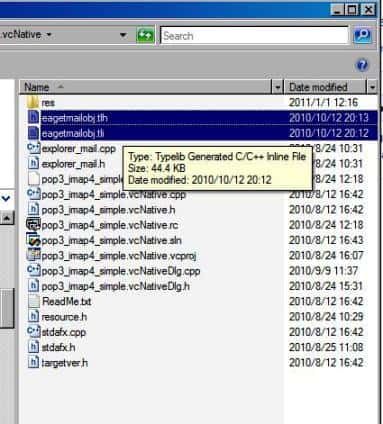
#include "eagetmailobj.tlh"
using namespace EAGetMailObjLib;
You can also import the type library by EAGetMailObj.dll like this:
// change it to EAGetMailObj.dll full path.
#import "C:\\Program Files (x86)\\EAGetMail\\Lib\\x86\\EAGetMailObj.dll"
using namespace EAGetMailObjLib;
Then you can start to use EAGetMail Object in your Visual C++ Project.
Add Reference of EAGetMailObj ActiveX Object to VBScript/ASP Project
You just need to install EAGetMail ActiveX Object on your machine, then you can use it directly.
Add Reference of EAGetMailObj ActiveX Object to Delphi Project
To use EAGetMail Mail ActiveX Object in your Delphi project, the first step is "Add Unit file of EAGetMail to your project". Please go to "C:\Program Files\EAGetMail\Include\delphi" or "C:\Program Files (x86)\EAGetMail\Include\delphi" folder, find "EAGetMailObjLib_TLB.pas", and then copy this file to your project folder.
// include EAGetMailObjLib_TLB unit to your Delphi Project
unit Unit1;

interface

uses
  Windows, Messages, SysUtils, Variants, Classes, Graphics, Controls, Forms,
  Dialogs, EAGetMailObjLib_TLB, StdCtrls;
Then you can start to use EAGetMail ActiveX Object in your Delphi Project.
You can also create EAGetMailObjLib_TLB.pas manually by Delphi like this:
First of all, create a standard delphi project: select menu "Project" -> "Import Type Library", checked "EAGetMail ActiveX Object" and click "Create Unit". Then include "EAGetMailObjLib_TLB" in your project.
First of all, create a standard delphi project: select menu Component -> Import component... -> Import a type library -> checked "EAGetMail ActiveX Object", have "Generate Component Wrapper" checked and click "Create Unit". Then include "EAGetMailObjLib_TLB" in your project.
Deploying EAGetMail with Application
EAGetMail ActiveX Object is a COM object, you need to copy it to your target machine and run Regsvr32 "c:\my folder\eagetmailobj.dll" to register it as a COM object. Download EAGetMail installer and run it on your machine, the dll will be registered automatically.
If you want to distribute/deploy without EAGetMail installer.
1. copy eagetmailobj.dll to destination machine. (run-time file of EAGetMail ActiveX Object)
2. run "Regsvr32 [path]\eagetmailobj.dll" under DOS prompt. (register EAGetMail ActiveX Object as com object)

In windows vista/7/8 or later version, you MUST open DOS command by "run as administrator", otherwise, regsvr32 will be failed.
To start a command prompt as an administrator

Click Start, click All Programs, and then click Accessories.
Right-click Command prompt, and then click Run as administrator.
If the User Account Control dialog box appears, confirm that the action it displays is what you want, and then click Continue.


To start a command prompt as an administrator (alternative method)

Click Start.
In the Start Search box, type cmd, and then press CTRL+SHIFT+ENTER.
If the User Account Control dialog box appears, confirm that the action it displays is what you want, and then click Continue.
Windows x64(AMD64)
For VBScript/ASP application on Windows x64 platform.
For Visual C++, Delphi application compiled to x64 native code.
Please use the dll in EAGetMail "installation path\Lib\native\x64\eagetmailobj.dll" (eagetmailobj.dll for x64).
For Visual Basic 6.0 application, because it is always 32bit application, so it can work fine without EAGetMail ActiveX Object X64 File.
Seperate builds of run-time dll for 32 and x64 platform
| File | Platform |
| Lib\native\x86\EAGetMailObj.dll | 32 bit |
| Lib\native\x64\EAGetMailObj.dll | 64 bit |
Distribute EAGetMail ActiveX Object by Manifest file
For VB6, C++, DELPHI or other standard exe application, you can distribute EAGetMailObj.dll with your application to target machine without COM-registration. To learn more detail, please have a look at Registration-free COM with Manifest File.
Send/Edit/Compose Email
EAGetMail ActiveX Object doesn't send, edit or compose email. To send, edit or compose email, please use EASendMail SMTP Component.
Example
[Visual Basic 6.0, VBScript, Visual C++, Delphi] The following example demonstrates how to receive email with EAGetMail POP3 & IMAP ActiveX Object, but it doesn't demonstrates the events and mail parsing usage. To get the full samples of EAGetMail, please refer to Samples section.
[Visual Basic 6.0]
Public Sub ReceiveMail( _
ByVal sServer As String, _
ByVal sUserName As String, _
ByVal sPassword As String, _
ByVal bSSLConnection As Boolean)

    Const MailServerPop3 = 0
    Const MailServerImap4 = 1
    Const MailServerEWS = 2
    Const MailServerDAV = 3
    Const MailServerMsGraph = 4

    'For evaluation usage, please use "TryIt" as the license code, otherwise the
    '"invalid license code" exception will be thrown. However, the object will expire in 1-2 months, then
    '"trial version expired" exception will be thrown.
    Dim oClient As New EAGetMailObjLib.MailClient
    oClient.LicenseCode = "TryIt"

    'To receive email from imap4 server, please change
    'MailServerPop3 to MailServerImap4 to MailServer.Protocol

    'To receive email with Exchange Web Service, please change
    'MailServerPop3 to MailServerEWS to MailServer.Protocol

    'To receive email with Exchange WebDAV, please change
    'MailServerPop3 to MailServerDAV to MailServer.Protocol

    'Exchange Server supports POP3/IMAP4 protocol as well, but in Exchange 2007
    'or later version, POP3/IMAP4 service is disabled by default. If you don't want to use POP3/IMAP4
    'to download email from Exchange Server, you can use Exchange Web Service(Exchange 2007/2010 or
    'later version) or WebDAV(Exchange 2000/2003) protocol.

    Dim oServer As New EAGetMailObjLib.MailServer
    oServer.Server = sServer
    oServer.User = sUserName
    oServer.Password = sPassword
    oServer.SSLConnection = bSSLConnection
    oServer.Protocol = MailServerPop3

    ''by default, the pop3 port is 110, imap4 port is 143,
    'the pop3 ssl port is 995, imap4 ssl port is 993
    'you can also change the port like this
    'oServer.Port = 110
    If oServer.Protocol = MailServerImap4 Then
        If oServer.SSLConnection Then
            oServer.Port = 993 'SSL IMAP4
        Else
            oServer.Port = 143 'IMAP4 normal
        End If
    Else
        If oServer.SSLConnection Then
            oServer.Port = 995 'SSL POP3
        Else
            oServer.Port = 110 'POP3 normal
        End If
    End If

    On Error GoTo ErrorHandle
        oClient.Connect oServer
        Dim infos As EAGetMailObjLib.MailInfoCollection
        Set infos = oClient.GetMailInfoList()

        Dim i
        For i = 0 To infos.Count - 1
            Dim info As EAGetMailObjLib.MailInfo
            Set info = infos.Item(i)

            Dim oMail As EAGetMailObjLib.Mail
            Set oMail = oClient.GetMail(info)
            'Save mail to local
            oMail.SaveAs "d:\tempfolder\" & i & ".eml", True

            ' Delete email from server
            oClient.Delete info
        Next

        '' Delete method just mark the email as deleted,
        ' Quit method expunge the emails from server permanently.
        oClient.Quit
        Exit Sub
ErrorHandle:
        ''Error handle
        MsgBox Err.Description

        oClient.Close
End Sub


[VBScript]
Sub ReceiveMail( _
ByVal sServer, _
ByVal sUserName, _
ByVal sPassword, _
ByVal bSSLConnection)

    Const MailServerPop3 = 0
    Const MailServerImap4 = 1
    Const MailServerEWS = 2
    Const MailServerDAV = 3
    Const MailServerMsGraph = 4

    'For evaluation usage, please use "TryIt" as the license code, otherwise the
    '"invalid license code" exception will be thrown. However, the object will expire in 1-2 months, then
    '"trial version expired" exception will be thrown.
    Dim oClient
    Set oClient = CreateObject("EAGetMailObj.MailClient")
    oClient.LicenseCode = "TryIt"

    'To receive email from imap4 server, please change
    'MailServerPop3 to MailServerImap4 to MailServer.Protocol

    'To receive email with Exchange Web Service, please change
    'MailServerPop3 to MailServerEWS to MailServer.Protocol

    'To receive email with Exchange WebDAV, please change
    'MailServerPop3 to MailServerDAV to MailServer.Protocol

    'Exchange Server supports POP3/IMAP4 protocol as well, but in Exchange 2007
    'or later version, POP3/IMAP4 service is disabled by default. If you don't want to use POP3/IMAP4
    'to download email from Exchange Server, you can use Exchange Web Service(Exchange 2007/2010 or
    'later version) or WebDAV(Exchange 2000/2003) protocol.
    Dim oServer
    Set oServer = CreateObject("EAGetMailObj.MailServer")
    oServer.Server = sServer
    oServer.User = sUserName
    oServer.Password = sPassword
    oServer.SSLConnection = bSSLConnection
    oServer.Protocol = MailServerPop3

    ''by default, the pop3 port is 110, imap4 port is 143,
    'the pop3 ssl port is 995, imap4 ssl port is 993
    'you can also change the port like this
    'oServer.Port = 110
    If oServer.Protocol = MailServerImap4 Then
        If oServer.SSLConnection Then
            oServer.Port = 993 'SSL IMAP4
        Else
            oServer.Port = 143 'IMAP4 normal
        End If
    Else
        If oServer.SSLConnection Then
            oServer.Port = 995 'SSL POP3
        Else
            oServer.Port = 110 'POP3 normal
        End If
    End If


    oClient.Connect oServer
    Dim infos
    Set infos = oClient.GetMailInfoList()

    Dim i
    For i = 0 To infos.Count - 1
        Dim info
        Set info = infos.Item(i)

        Dim oMail
        Set oMail = oClient.GetMail(info)
        'Save mail to local
        oMail.SaveAs "d:\tempfolder\" & i & ".eml", True

        ' Delete email from server
        oClient.Delete info
    Next

    '' Delete method just mark the email as deleted,
    ' Quit method expunge the emails from server permanently.
    oClient.Quit
End Sub


[Visual C++]
#include "stdafx.h"
#include <windows.h>

#include "eagetmailobj.tlh"
using namespace EAGetMailObjLib;

void ReceiveMail(
        LPCTSTR sServer,
        LPCTSTR sUserName,
        LPCTSTR sPassword,
        bool bSSLConnection)
{
    ::CoInitialize(NULL);

    const int MailServerPop3 = 0;
    const int MailServerImap4 = 1;
    const int MailServerEWS = 2;
    const int MailServerDAV = 3;
    const int MailServerMsGraph = 4;

    try
    {
        IMailClientPtr oClient;
        oClient.CreateInstance(__uuidof(EAGetMailObjLib::MailClient));

        IMailServerPtr oServer;
        oServer.CreateInstance(__uuidof(EAGetMailObjLib::MailServer));

        // For evaluation usage, please use "TryIt" as the license code, otherwise the
        // "invalid license code" exception will be thrown. However, the object will expire in 1-2 months, then
        // "trial version expired" exception will be thrown.
        oClient->LicenseCode = _T("TryIt");

        oServer->Server = sServer;
        oServer->User = sUserName;
        oServer->Password = sPassword;

        INT nProtocol = MailServerPop3;

        //To receive email from imap4 server, please change
        //MailServerPop3 to MailServerImap4 in MailServer constructor

        //To receive email with Exchange Web Service, please change
        //MailServerPop3 to MailServerEWS to MailServer.Protocol

        //To receive email with Exchange WebDAV, please change
        //MailServerPop3 to MailServerDAV to MailServer.Protocol

        //Exchange Server supports POP3/IMAP4 protocol as well, but in Exchange 2007
        //or later version, POP3/IMAP4 service is disabled by default. If you don't want to use POP3/IMAP4
        //to download email from Exchange Server, you can use Exchange Web Service(Exchange 2007/2010 or
        //later version) or WebDAV(Exchange 2000/2003) protocol.

        //For Exchange Web Service/WebDAV, please ignore
        //Port property. But for Exchange Web Service, please set SSLConnection to True


        oServer->Protocol = nProtocol;
        if(nProtocol == MailServerPop3)
        {
            if(bSSLConnection)
            {
                oServer->Port = 995;
                oServer->SSLConnection = VARIANT_TRUE;
            }
            else
            {
                oServer->Port = 110;
            }
        }
        else
        {
            if(bSSLConnection)
            {
                oServer->Port = 993;
                oServer->SSLConnection = VARIANT_TRUE;
            }
            else
            {
                oServer->Port = 143;
            }
        }

        oClient->Connect(oServer);

        IMailInfoCollectionPtr infos = oClient->GetMailInfoList();

        for(long i = 0; i < infos->Count; i++)
        {
            IMailInfoPtr pInfo = infos->GetItem(i);

            IMailPtr oMail = oClient->GetMail(pInfo);
            TCHAR szFile[MAX_PATH+1];
            memset(szFile, 0, sizeof(szFile));
            ::wsprintf(szFile, _T("d:\\tempfolder\\%d.eml"), i);
            //save to local disk
            oMail->SaveAs(szFile, VARIANT_TRUE);
            oMail.Release();

            // delete email from server
            oClient->Delete(pInfo);
        }

        // Delete method just mark the email as deleted,
        // Quit method expunge the emails from server permanently.
        oClient->Quit();
    }
    catch(_com_error &ep)
    {
        _tprintf(_T("ERROR: %s\r\n"),  (TCHAR*)ep.Description());
    }

    ::CoUninitialize();
}


[Delphi]
unit Unit1;

interface

uses
    Windows, Messages, SysUtils, Variants, Classes, Graphics, Controls, Forms,
    Dialogs, StdCtrls, EAGetMailObjLib_TLB;

type
    TForm1 = class(TForm)
    private
        { Private declarations }
        procedure ReceiveMail(server: WideString; user: WideString; password: WideString; useSslConnection: Boolean);
    public
        { Public declarations }
    end;

const
    MailServerPop3 = 0;
    MailServerImap4 = 1;
    MailServerEWS = 2;
    MailServerDAV = 3;

var
    Form1: TForm1;

implementation

{$R *.dfm}

procedure TForm1.ReceiveMail(server: WideString; user: WideString; password: WideString; useSslConnection: Boolean);
var
    oServer: TMailServer;
    oClient: TMailClient;
    oTools: TTools;
    oMail: IMail;
    infos: IMailInfoCollection;
    oInfo: IMailInfo;
    localInbox, fileName: WideString;
    i: Integer;
begin

    try
        // set current thread code page to system default code page.
        SetThreadLocale(GetSystemDefaultLCID());
        oTools := TTools.Create(Application);

        // Create a folder named "inbox" under
        // current directory to store the email files
        localInbox := GetCurrentDir() + '\inbox';
        oTools.CreateFolder(localInbox);

        oServer := TMailServer.Create(Application);
        oServer.Server := server;
        oServer.User := user;
        oServer.Password := password;
        oServer.Protocol := MailServerPop3;

        // Enable SSL/TLS Connection, most modern email server require SSL/TLS connection by default.
        oServer.SSLConnection := useSslConnection;

        if useSslConnection then
            begin
                // Set 995 SSL POP3 port, for IMAP4, use 993 SSL port
                oServer.Port := 995;
            end
        else
        begin
            // Set 110 POP3 port, for IMAP4, use 143 port
            oServer.Port := 110;
        end;

        // For evaluation usage, please use "TryIt" as the license code, otherwise the
        // "invalid license code" exception will be thrown. However, the object will expire in 1-2 months, then
        // "trial version expired" exception will be thrown.
        oClient := TMailClient.Create(Application);
        oClient.LicenseCode := 'TryIt';

        oClient.Connect1(oServer.DefaultInterface);
        ShowMessage('Connected!');

        infos := oClient.GetMailInfoList();
        ShowMessage(Format('Total %d email(s)', [infos.Count]));

        for i := 0 to infos.Count - 1 do
            begin
                oInfo := infos.Item[i];

                ShowMessage(Format('Index: %d; Size: %d; UIDL: ' + oInfo.UIDL,
                [oInfo.Index, oInfo.Size]));

                // Generate a random file name by current local datetime,
                // You can use your method to generate the filename if you do not like it
                fileName := localInbox + '\' + oTools.GenFileName(i) + '.eml';

                // Receive email from POP3 server
                oMail := oClient.GetMail(oInfo);

                ShowMessage('From: ' + oMail.From.Address + #13#10 +
                    'Subject: ' + oMail.Subject);

                // Save email to local disk
                oMail.SaveAs(fileName, true);

                // Mark email as deleted from POP3 server
                oClient.Delete(oInfo);
            end;

        // Quit and expunge emails marked as deleted from POP3 server
        oClient.Quit;

    except
        on ep:Exception do
            ShowMessage('Error: ' + ep.Message);
    end;

end;

end.
See Also
User Authentication and SSL Connection
Enable TLS 1.2 on Windows XP/2003/2008/7/2008 R2
Using Gmail IMAP4 OAUTH
Using Gmail/GSuite Service Account + IMAP4 OAUTH
Using Office365 EWS OAUTH
Using Office365 EWS OAUTH in Background Service
Using Hotmail IMAP4 OAUTH
Registration-free COM with Manifest File
Digital Signature and E-mail Encryption/Decryption
Unique Identifier (UIDL) in POP3 and IMAP4 protocol
Parse Bounced Email (delivery-report)
Work with winmail.dat (TNEF Parser)
EAGetMail ActiveX Object References
EAGetMail POP3 & IMAP4 Component Samples
Online Tutorials
Read Email and Parse Email in VB
6.0 - Tutorial
Read Email and Parse Email in
Visual C++ - Tutorial
Read Email and Parse Email in
Delphi - Tutorial