Add Reference of EAGetMail to Visual Stuido.NET Project
To use EAGetMail POP3 and IMAP Component in your project, the first step is "Add reference of EAGetMail to your project". Please create/open your project with Visual Studio.NET, then choose menu->"Project"->"Add Reference"->".NET"->"Browse...", and choose the "Installation Path\Lib\[netversion]\EAGetMail.dll" from your disk, click "Open"->"OK", the reference of EAGetMail will be added to your project, and you can start to use EAGetMail POP3 and IMAP Component in your project.
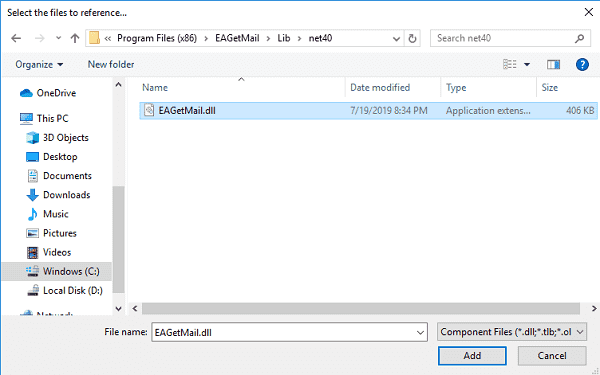
Install from NuGet
You can also install the run-time assembly by NuGet. Run the following command in the NuGet Package Manager Console:
Install-Package EAGetMail
Deploying EAGetMail with Application
After compiling your project, a copy of EAGetMail.dll will be generated by compiler in same folder of your application executable file. Packing all the *.dll and *.exe in the folder to installer is ok. As EAGetMail is a pure .NET Component, it doesn't require "Regsvr32" (self-register) to register the dll.
Deploying EAGetMail with ASP.NET/Web Application
The EAGetMail.dll should be copied to [website root folder]\bin folder or [virtual directory root]\bin folder. If the project is created by Visual Studio.NET + FrontPage Extension directly, Visual Studio.NET will deploy EAGetMail.dll automatically.
Seperate builds of run-time assembly for .NET Framework 2.0, 4.0, 4.5, 4.6.1, 4.7.2, 4.8.1, .NET 6.0, .NET 7.0, .NET 8.0, NET Standard 2.0 and .NET Compact Framework 2.0, 3.5.
| File | .NET Framework Version |
| Lib\net20\EAGetMail.dll |
Built with .NET Framework 2.0
It requires .NET Framework 2.0, 3.5 or later version. |
| Lib\net40\EAGetMail.dll |
Built with .NET Framework 4.0
It requires .NET Framework 4.0 or later version. |
| Lib\net45\EAGetMail.dll |
Built with .NET Framework 4.5
It requires .NET Framework 4.5 or later version. |
| Lib\net461\EAGetMail.dll |
Built with .NET Framework 4.6.1
It requires .NET Framework 4.6.1 or later version. |
| Lib\net472\EAGetMail.dll |
Built with .NET Framework 4.7.2
It requires .NET Framework 4.7.2 or later version. |
| Lib\net481\EAGetMail.dll |
Built with .NET Framework 4.8.1
It requires .NET Framework 4.8.1 or later version. |
| Lib\net6.0\EAGetMail.dll |
Built with .NET 6.0
It requires .NET 6.0 or later version. |
| Lib\net7.0\EAGetMail.dll |
Built with .NET 7.0
It requires .NET 7.0 or later version. |
| Lib\net8.0\EAGetMail.dll |
Built with .NET 8.0
It requires .NET 8.0 or later version. |
| Lib\netstandard2.0\EAGetMail.dll |
Built with .NET Standard 2.0
It requires .NET Standard 2.0 or later version. |
| Lib\net20-cf\EAGetMail.dll |
Built with .NET Compact Framework 2.0
It requires .NET Compact Framework 2.0, 3.5 or later version. |
| Lib\net35-cf\EAGetMail.dll |
Built with .NET Compact Framework 3.5
It requires .NET Compact Framework 3.5 or later version. |
Run-time library for .NET Compact Framework 2.0, 3.5
To use EAGetMail in .NET Compact Framework 2.0/3.5, you should use EAGetMailCF20.dll/EAGetMailCF35.dll instead of EAGetMail.dll in your project. And if SSL connection is used in .NET Compact Framework 2.0/3.5, you should also copy "SecurityInterface.dll" to the same folder of EAGetMailCF20.dll/EAGetMailCF35.dll.
Note: EAGetMailCF20/EAGetMailCF35 does not support digital signature verification and message decryption.
Send/Edit/Compose Email
EAGetMail Component doesn't send, edit or compose email. To send, edit or compose email, please use EASendMail SMTP Component.
Example
[Visual Basic, C#, C++] The following example demonstrates how to receive email with EAGetMail POP3 & IMAP Component, but it doesn't demonstrates the events and mail parsing usage. To get the full samples of EAGetMail, please refer to Samples section.
[VB - Retrieve Email from Server]
Imports System
Imports System.Globalization
Imports System.IO
Imports System.Text
Imports EAGetMail

Public Class TestClass
    ' Generate an unqiue email file name based on date time.
    Shared Function _generateFileName(ByVal sequence As Integer) As String
        Dim currentDateTime As DateTime = DateTime.Now
        Return String.Format("{0}-{1:000}-{2:000}.eml",
                            currentDateTime.ToString("yyyyMMddHHmmss", New CultureInfo("en-US")),
                            currentDateTime.Millisecond,
                            sequence)
    End Function

    Public Sub ReceiveMail(server As String, user As String, password As String, useSsl As Boolean)

        Try
            ' Create a folder named "inbox" under current directory
            ' to save the email retrieved.
            Dim localInbox As String = String.Format("{0}\inbox", Directory.GetCurrentDirectory())

            ' If the folder is not existed, create it.
            If Not Directory.Exists(localInbox) Then
                Directory.CreateDirectory(localInbox)
            End If

            ' To receive email from IMAP4 server, please change
            ' ServerProtocol.Pop3 to ServerProtocol.Imap4 in MailServer constructor

            ' To receive email with Exchange Web Service, please change
            ' ServerProtocol.Pop3 to ServerProtocol.ExchangeEWS to MailServer constructor

            ' To receive email with Exchange WebDAV, please change
            ' ServerProtocol.Pop3 to ServerProtocol.ExchangeWebDAV to MailServer constructor

            ' Exchange Server supports POP3/IMAP4 protocol as well, but in Exchange 2007
            ' Or later version, POP3/IMAP4 service Is disabled by default. If you don't want to use POP3/IMAP4
            ' to download email from Exchange Server, you can use Exchange Web Service (Exchange 2007-2019 Or
            ' later version) Or WebDAV (Exchange 2000/2003) protocol.

            ' Most modern email server require SSL/TLS connection,
            ' set useSsl to true Is recommended.
            Dim oServer As New MailServer(server, user, password, useSsl,
                        ServerAuthType.AuthLogin, ServerProtocol.Pop3)

            ' POP3 port Is 110, POP3 SSL port Is 995
            ' IMAP4 port Is 143,  IMAP4 SSL port Is 993.
            ' EWS/WebDAV, please ignore Port property.
            If oServer.Protocol = ServerProtocol.Pop3 Then
                oServer.Port = If(useSsl, 995, 110)
            ElseIf oServer.Protocol = ServerProtocol.Imap4 Then
                oServer.Port = If(useSsl, 993, 143)
            End If

            Console.WriteLine("Connecting server ...")
            Dim oClient As New MailClient("TryIt")
            oClient.Connect(oServer)

            Console.WriteLine("Retrieving email list ...")
            Dim infos() As MailInfo = oClient.GetMailInfos()

            Console.WriteLine("Total {0} email(s)", infos.Length)

            For i As Integer = 0 To infos.Length - 1
                Console.WriteLine("Checking {0}/{1} ...", i + 1, infos.Length)
                Dim info As MailInfo = infos(i)

                ' Generate an unqiue email file name based on date time.
                Dim fileName As String = _generateFileName(i + 1)
                Dim fullPath As String = String.Format("{0}\{1}", localInbox, fileName)

                Console.WriteLine("Downloading {0}/{1} ...", i + 1, infos.Length)
                Dim oMail As Mail = oClient.GetMail(info)

                ' Save email to local disk
                oMail.SaveAs(fullPath, True)

                ' Mark email as deleted on server.
                Console.WriteLine("Deleting ... {0}/{1}", i + 1, infos.Length)
                oClient.Delete(info)
            Next

            Console.WriteLine("Disconnecting ...")
            ' Delete method just mark the email as deleted,
            ' Quit method expunge the emails from server permanently.
            oClient.Quit()

            Console.WriteLine("Completed!")
        Catch ep As Exception
            Console.WriteLine("Error: {0}", ep.Message)
        End Try

    End Sub
End Class


[C# - Retrieve Email from Server]
using System;
using System.IO;
using System.Globalization;
using System.Text;
using EAGetMail;

class TestClass
{
    // Generate an unqiue email file name based on date time
    static string _generateFileName(int sequence)
    {
        DateTime currentDateTime = DateTime.Now;
        return string.Format("{0}-{1:000}-{2:000}.eml",
            currentDateTime.ToString("yyyyMMddHHmmss", new CultureInfo("en-US")),
            currentDateTime.Millisecond,
            sequence);
    }

    public void ReceiveMail(string server, string user, string password, bool useSsl)
    {
        try
        {
            // Create a folder named "inbox" under current directory
            // to save the email retrieved.
            string localInbox = string.Format("{0}\\inbox", Directory.GetCurrentDirectory());
            // If the folder is not existed, create it.
            if (!Directory.Exists(localInbox))
            {
                Directory.CreateDirectory(localInbox);
            }

            // To receive email from IMAP4 server, please change
            // ServerProtocol.Pop3 to ServerProtocol.Imap4 in MailServer constructor

            // To receive email with Exchange Web Service, please change
            // ServerProtocol.Pop3 to ServerProtocol.ExchangeEWS to MailServer constructor

            // To receive email with Exchange WebDAV, please change
            // ServerProtocol.Pop3 to ServerProtocol.ExchangeWebDAV to MailServer constructor

            // Exchange Server supports POP3/IMAP4 protocol as well, but in Exchange 2007
            // or later version, POP3/IMAP4 service is disabled by default. If you don't want to use POP3/IMAP4
            // to download email from Exchange Server, you can use Exchange Web Service (Exchange 2007-2019 or
            // later version) or WebDAV (Exchange 2000/2003) protocol.

            // Most modern email server require SSL/TLS connection,
            // set useSsl to true is recommended.
            MailServer oServer = new MailServer(server, user, password, useSsl,
                ServerAuthType.AuthLogin, ServerProtocol.Pop3);

            // POP3 port is 110, POP3 SSL port is 995
            // IMAP4 port is 143,  IMAP4 SSL port is 993.
            // EWS/WebDAV, please ignore Port property.
            if (oServer.Protocol == ServerProtocol.Pop3)
            {
                oServer.Port = (useSsl) ? 995 : 110;
            }
            else if (oServer.Protocol == ServerProtocol.Imap4)
            {
                oServer.Port = (useSsl) ? 993 : 143;
            }

            Console.WriteLine("Connecting server ...");

            MailClient oClient = new MailClient("TryIt");
            oClient.Connect(oServer);

            Console.WriteLine("Retreiving email list ...");
            MailInfo[] infos = oClient.GetMailInfos();

            Console.WriteLine("Total {0} email(s)", infos.Length);

            for (int i = 0; i < infos.Length; i++)
            {
                Console.WriteLine("Checking {0}/{1} ...", i+1, infos.Length);
                MailInfo info = infos[i];

                // Generate an unqiue email file name based on date time.
                string fileName = _generateFileName(i + 1);
                string fullPath = string.Format("{0}\\{1}", localInbox, fileName);

                Console.WriteLine("Downloading {0}/{1} ...", i + 1, infos.Length);
                Mail oMail = oClient.GetMail(info);

                // Save mail to local file
                oMail.SaveAs(fullPath, true);

                // Mark the email as deleted on server.
                Console.WriteLine("Deleting ... {0}/{1}", i + 1, infos.Length);
                oClient.Delete(info);
            }

            Console.WriteLine("Disconnecting ...");
            // Delete method just mark the email as deleted,
            // Quit method expunge the emails from server permanently.
            oClient.Quit();

            Console.WriteLine("Completed!");
        }
        catch (Exception ep)
        {
            Console.WriteLine("Error: {0}", ep.Message);
        }
    }
}


[C++/CLI - Retrieve Email from Server]
using namespace System;
using namespace System::Globalization;
using namespace System::IO;
using namespace EAGetMail; //add EAGetMail namespace

// Generate an unqiue email file name based on date time
static String ^ _generateFileName(int sequence)
{
    DateTime currentDateTime = DateTime::Now;
    return String::Format("{0}-{1:000}-{2:000}.eml",
        currentDateTime.ToString("yyyyMMddHHmmss", gcnew CultureInfo("en-US")),
        currentDateTime.Millisecond,
        sequence);
}

void ReceiveMail(String ^server, String ^user, String ^password, bool useSsl)
{
    try
    {
        // Create a folder named "inbox" under current directory
        // to save the email retrieved.
        String ^localInbox = String::Format("{0}\\inbox", Directory::GetCurrentDirectory());
        // If the folder is not existed, create it.
        if (!Directory::Exists(localInbox))
        {
            Directory::CreateDirectory(localInbox);
        }

        // To receive email from IMAP4 server, please change
        // ServerProtocol.Pop3 to ServerProtocol.Imap4 in MailServer constructor

        // To receive email with Exchange Web Service, please change
        // ServerProtocol.Pop3 to ServerProtocol.ExchangeEWS to MailServer constructor

        // To receive email with Exchange WebDAV, please change
        // ServerProtocol.Pop3 to ServerProtocol.ExchangeWebDAV to MailServer constructor

        // Exchange Server supports POP3/IMAP4 protocol as well, but in Exchange 2007
        // or later version, POP3/IMAP4 service is disabled by default. If you don't want to use POP3/IMAP4
        // to download email from Exchange Server, you can use Exchange Web Service (Exchange 2007-2019 or
        // later version) or WebDAV (Exchange 2000/2003) protocol.

        // Most modern email server require SSL/TLS connection,
        // set useSsl to true is recommended.
        MailServer ^oServer = gcnew MailServer(server, user, password, useSsl,
            ServerAuthType::AuthLogin, ServerProtocol::Pop3);

        // POP3 port is 110, POP3 SSL port is 995
        // IMAP4 port is 143,  IMAP4 SSL port is 993.
        // EWS/WebDAV, please ignore Port property.
        if (oServer->Protocol == ServerProtocol::Pop3)
        {
            oServer->Port = (useSsl) ? 995 : 110;
        }
        else if (oServer->Protocol == ServerProtocol::Imap4)
        {
            oServer->Port = (useSsl) ? 993 : 143;
        }

        Console::WriteLine("Connecting server ...");

        MailClient ^oClient = gcnew MailClient("TryIt");
        oClient->Connect(oServer);

        Console::WriteLine("Retreiving email list ...");
        array<MailInfo^>^infos = oClient->GetMailInfos();

        Console::WriteLine("Total {0} email(s)", infos->Length);

        for (int i = 0; i < infos->Length; i++)
        {
            Console::WriteLine("Checking {0}/{1}", i + 1, infos->Length);
            MailInfo ^info = infos[i];

            // Generate an unqiue email file name based on date time
            String^ fileName = _generateFileName(i + 1);
            String^ fullPath = String::Format("{0}\\{1}", localInbox, fileName);

            Console::WriteLine("Downloading {0}/{1}", i + 1, infos->Length);
            Mail ^oMail = oClient->GetMail(info);

            // Save email to local disk
            oMail->SaveAs(fullPath, true);

            // Mark email as deleted on server.
            Console::WriteLine("Deleting ... {0}/{1}", i + 1, infos->Length);
            oClient->Delete(info);
        }

        Console::WriteLine("Disconnecting ...");
        // Delete method just mark the email as deleted,
        // Quit method expunge the emails from server permanently.
        oClient->Quit();

        Console::WriteLine("Completed!");
    }
    catch (Exception ^ep)
    {
        Console::WriteLine("Error: {0}", ep->Message);
    }
}
See Also
User Authentication and SSL Connection
Enable TLS 1.2 on Windows XP/2003/2008/7/2008 R2
Using Gmail IMAP4 OAUTH
Using Gmail/GSuite Service Account + IMAP4 OAUTH
Using Office365 EWS OAUTH
Using Office365 EWS OAUTH in Background Service
Using Hotmail IMAP4 OAUTH
Digital Signature and E-mail Encryption/Decryption
Unique Identifier (UIDL) in POP3 and IMAP4 protocol
Parse Bounced Email (delivery-report)
Work with winmail.dat (TNEF Parser)
EAGetMail Namespace References
EAGetMail POP3 & IMAP4 Component Samples
Online Tutorials
Read Email and Parse Email in
C# - Tutorial
Read Email and Parse Email in
VB.NET - Tutorial
Read Email and Parse Email
C++/CLI - Tutorial